<?xml version="1.0" encoding="utf-8"?><feed xmlns="http://www.w3.org/2005/Atom" ><generator uri="https://jekyllrb.com/" version="3.10.0">Jekyll</generator><link href="http://malcolmcrum.com/feed.xml" rel="self" type="application/atom+xml" /><link href="http://malcolmcrum.com/" rel="alternate" type="text/html" /><updated>2025-04-21T23:46:21+00:00</updated><id>http://malcolmcrum.com/feed.xml</id><title type="html">Malcolm Crum</title><subtitle>I make stuff with computers.</subtitle><author><name>Malcolm Crum</name></author><entry><title type="html">Migrating a Webpack project to Vite</title><link href="http://malcolmcrum.com/blog/2023/03/10/migrate-webpack-to-vite.html" rel="alternate" type="text/html" title="Migrating a Webpack project to Vite" /><published>2023-03-10T00:00:00+00:00</published><updated>2023-03-10T00:00:00+00:00</updated><id>http://malcolmcrum.com/blog/2023/03/10/migrate-webpack-to-vite</id><content type="html" xml:base="http://malcolmcrum.com/blog/2023/03/10/migrate-webpack-to-vite.html"><![CDATA[<p>At work we have a moderately sized React project that uses Webpack to build.
We have a few customizations for Webpack, mainly to try to get it to go a bit
faster, but I decided to look into <a href="https://vitejs.dev/">Vite</a> primarily
because I want to try to improve our build speeds. I was surprised at the
amount of obstacles we encountered along the way, so I’ve tried to lay them
out here in case anyone else is looking to do the same.</p>

<h1 id="multiple-entrypoints">Multiple entrypoints</h1>

<p>I think most Vite users have a single page that forms the basis of their
application - a SPA or single page app. React Router or something will handle
different paths, but it’ll all start from one index.html. Not us, however.</p>

<p>We render our index.html equivalent on the server-side (using Javalin with
Pebble templates) so we can server-side inject some variables for our
React code. We also have a bunch of different pages that serve as individual
React pages. This means we might have a template like this:</p>

<div class="language-plaintext highlighter-rouge"><div class="highlight"><pre class="highlight"><code>
{% block head %}
    {% include 'web/react.html.twig' %}
{% endblock %}

{% block body %}
&lt;div&gt;
    &lt;script&gt;
        const username = "{{ username }}";
    &lt;/script&gt;
	&lt;div id='user-root'&gt;&lt;/div&gt;
	&lt;script src="/dist/user-bundle.js"&gt;&lt;/script&gt;
&lt;/div&gt;
{% endblock %}

</code></pre></div></div>

<p>So, our Webpack config takes a bunch of entrypoints like <code class="language-plaintext highlighter-rouge">src/user.tsx</code> and
outputs <code class="language-plaintext highlighter-rouge">dist/user-bundle.js</code>. Vite supports this but it took me a lot longer
than I thought to figure it out. Documentation around this area expects
you to be building a <em>library</em> with multiple entrypoints, which will get you
code that won’t easily run in a browser. The Vite config is actually pretty
simple:</p>

<div class="language-ts highlighter-rouge"><div class="highlight"><pre class="highlight"><code><span class="k">export</span> <span class="k">default</span> <span class="nx">defineConfig</span><span class="p">({</span>
    <span class="na">plugins</span><span class="p">:</span> <span class="p">[</span><span class="nx">react</span><span class="p">()],</span>
    <span class="na">build</span><span class="p">:</span> <span class="p">{</span>
        <span class="na">manifest</span><span class="p">:</span> <span class="kc">true</span><span class="p">,</span> <span class="c1">// crucial for our backend integration</span>
        <span class="na">rollupOptions</span><span class="p">:</span> <span class="p">{</span>
            <span class="na">input</span><span class="p">:</span> <span class="p">{</span>
                <span class="na">user</span><span class="p">:</span> <span class="dl">'</span><span class="s1">src/user.tsx</span><span class="dl">'</span><span class="p">,</span>
                <span class="na">foo</span><span class="p">:</span> <span class="dl">'</span><span class="s1">src/foo.tsx</span><span class="dl">'</span><span class="p">,</span> <span class="c1">//etc</span>
            <span class="p">}</span>
        <span class="p">}</span>
    <span class="p">}</span>
<span class="p">})</span>
</code></pre></div></div>

<p>While Webpack would output a single bundled JS file, which somehow included
CSS as well, Vite outputs dozens of JS and CSS files. Pointing our backend
to it is easy in dev mode, after running <code class="language-plaintext highlighter-rouge">vite</code>:</p>

<div class="language-plaintext highlighter-rouge"><div class="highlight"><pre class="highlight"><code>
{% block head %}
    &lt;script type="module"&gt;
        import RefreshRuntime from 'http://localhost:5173/@react-refresh'
        RefreshRuntime.injectIntoGlobalHook(window)
        window.$RefreshReg$ = () =&gt; {}
        window.$RefreshSig$ = () =&gt; (type) =&gt; type
        window.__vite_plugin_react_preamble_installed__ = true
    &lt;/script&gt;
    &lt;script type="module" src="http://localhost:5173/@vite/client"&gt;&lt;/script&gt;
{% endblock %}

{% block body %}
&lt;div&gt;
    &lt;script&gt;
        const username = "{{ username }}";
    &lt;/script&gt;
	&lt;div id='user-root'&gt;&lt;/div&gt;
	&lt;script src="http://localhost:4568/src/user.tsx"&gt;&lt;/script&gt;
&lt;/div&gt;
{% endblock %}

</code></pre></div></div>

<p>We no longer include <code class="language-plaintext highlighter-rouge">react.html.twig</code> - previously we had shared <code class="language-plaintext highlighter-rouge">react.js</code>
and <code class="language-plaintext highlighter-rouge">react-dom.js</code> between all our entrypoints, handling the code splitting
ourselves. But Vite does all that for us.</p>

<p>Instead we inject a bit of custom code which handles hot-reloading for us
(that’s something we didn’t have before!). And where before we pointed to our
bundled js file, now we point straight to the .tsx file. This is an unexpected
bit of magic but from here Vite’s dev server will provide the compiled JS,
CSS, and whatever other resources we need.</p>

<h2 id="building-for-production">Building for production</h2>

<p>Getting production working, on the other hand, was a fair bit more complicated.
For any given entrypoint, like <code class="language-plaintext highlighter-rouge">src/users.tsx</code>, we get a bunch of files like
<code class="language-plaintext highlighter-rouge">dist/users-abc123.js</code>, <code class="language-plaintext highlighter-rouge">dist/users-foo456.css</code>, and <code class="language-plaintext highlighter-rouge">dist/users-789def.js</code>.
To know which ones we need to import, we read the <code class="language-plaintext highlighter-rouge">dist/manifest.json</code> file,
which contains a key/value mapping of every dependency for every file. Look up
<code class="language-plaintext highlighter-rouge">src/users.tsx</code> and you’ll get something like this:</p>

<div class="language-json highlighter-rouge"><div class="highlight"><pre class="highlight"><code><span class="p">{</span><span class="w">
    </span><span class="nl">"src/users.tsx"</span><span class="p">:</span><span class="w"> </span><span class="p">{</span><span class="w">
        </span><span class="nl">"file"</span><span class="p">:</span><span class="w"> </span><span class="s2">"/dist/users-abc123.js"</span><span class="p">,</span><span class="w">
        </span><span class="nl">"imports"</span><span class="p">:</span><span class="w"> </span><span class="p">[</span><span class="w"> </span><span class="s2">"/dist/users-789def.js"</span><span class="w"> </span><span class="p">],</span><span class="w">
        </span><span class="nl">"css"</span><span class="p">:</span><span class="w"> </span><span class="p">[</span><span class="w"> </span><span class="s2">"/assets/users-foo456.css"</span><span class="w"> </span><span class="p">]</span><span class="w">
    </span><span class="p">}</span><span class="w">
</span><span class="p">}</span><span class="w">
</span></code></pre></div></div>

<p>The <code class="language-plaintext highlighter-rouge">file</code> is the entrypoint to our app, which will import our other dependencies.
But <code class="language-plaintext highlighter-rouge">css</code> contains only the CSS files necessary for this JS file - important to
note that we need to recursively add the CSS files for all the imports to ensure
we get all the CSS needed. Then our template will look like this:</p>

<div class="language-plaintext highlighter-rouge"><div class="highlight"><pre class="highlight"><code>
&lt;script src="/dist/{{ manifest.file() }" type="module"&gt;&lt;/script&gt;
{% for css in manifest.css() %}
    &lt;link rel="stylesheet" href="/assets/{{ css }}"&gt;
{% endfor %}

</code></pre></div></div>

<p>So! If we’ve done our recursion right we should end up with a rendered HTML file
linking the entry point JS and all the CSS files we’ll need.</p>

<h1 id="react-error-130-in-prod">React error #130 in prod</h1>

<p>Once you have your production build going, you might discover something unexpected:
crashes that did not appear in the dev build. To be honest I’m a bit shocked that this
is <a href="https://github.com/vitejs/vite/issues/2139">an open issue since early 2021</a> -
discovering a bug only when you hit prod seems like a big deal! Apparently it is caused
by an older-style export syntax that is not supported by Vite. Tracking down the library,
on the other hand, is non-trivial: I did it by commenting out significant chunks of code
bit by bit until I’d found the culprit. Once I’d found it (<code class="language-plaintext highlighter-rouge">react-modal</code> was the cause)
the fix is relatively easy. Change this code:</p>

<div class="language-ts highlighter-rouge"><div class="highlight"><pre class="highlight"><code><span class="k">import</span> <span class="o">*</span> <span class="k">as</span> <span class="nx">ReactModal</span> <span class="k">from</span> <span class="dl">'</span><span class="s1">react-modal/lib</span><span class="dl">'</span><span class="p">;</span>
</code></pre></div></div>

<p>To this:</p>

<div class="language-ts highlighter-rouge"><div class="highlight"><pre class="highlight"><code><span class="k">import</span> <span class="o">*</span> <span class="k">as</span> <span class="nx">RM</span> <span class="k">from</span> <span class="dl">'</span><span class="s1">react-modal/lib</span><span class="dl">'</span><span class="p">;</span>
<span class="kd">const</span> <span class="nx">ReactModal</span> <span class="o">=</span> <span class="p">(</span><span class="nx">RM</span> <span class="k">as</span> <span class="kr">any</span><span class="p">).</span><span class="k">default</span> <span class="o">||</span> <span class="nx">RM</span><span class="p">;</span>
</code></pre></div></div>

<p>An easy fix… but can be a little painful to find.</p>

<h1 id="circular-references-breaking-createcontext">Circular references breaking createContext</h1>

<p>Fixing this one was easier than I thought, thankfully. If you have a file like this,
with a React context:</p>

<div class="language-tsx highlighter-rouge"><div class="highlight"><pre class="highlight"><code><span class="k">export</span> <span class="kd">const</span> <span class="nx">Context</span> <span class="o">=</span> <span class="nx">React</span><span class="p">.</span><span class="nx">createContext</span><span class="p">(</span><span class="kc">null</span><span class="p">);</span>

<span class="k">export</span> <span class="k">default</span> <span class="kd">function</span> <span class="p">()</span> <span class="p">{</span>
    <span class="k">return</span> <span class="p">&lt;</span><span class="nc">Context</span><span class="p">.</span><span class="nc">Provider</span> <span class="na">value</span><span class="p">=</span><span class="si">{</span><span class="mi">42</span><span class="si">}</span><span class="p">&gt;</span>
        <span class="p">&lt;</span><span class="nc">Child</span><span class="p">/&gt;</span>
    <span class="p">&lt;/</span><span class="nc">Context</span><span class="p">.</span><span class="nc">Provider</span><span class="p">&gt;;</span>
<span class="p">}</span>
</code></pre></div></div>

<p>And elsewhere you have a <code class="language-plaintext highlighter-rouge">child.tsx</code> that references this context:</p>
<div class="language-tsx highlighter-rouge"><div class="highlight"><pre class="highlight"><code><span class="k">export</span> <span class="kd">function</span> <span class="nx">Child</span><span class="p">()</span> <span class="p">{</span>
    <span class="kd">const</span> <span class="nx">value</span> <span class="o">=</span> <span class="nx">useContext</span><span class="p">(</span><span class="nx">Context</span><span class="p">);</span>
<span class="p">}</span>
</code></pre></div></div>

<p>You have a circular reference: the first includes <code class="language-plaintext highlighter-rouge">child.tsx</code>, while <code class="language-plaintext highlighter-rouge">child.tsx</code> imports
<code class="language-plaintext highlighter-rouge">Context</code> from its parent. Apparently this is no big deal for Webpack but Vite can’t handle it -
something to do with hot module reloading, so at least this error only happens in dev.</p>

<p><a href="https://github.com/vitejs/vite/issues/3033">The Github bug</a> has some helpful tips. Here’s how I
fixed it:</p>

<ol>
  <li><code class="language-plaintext highlighter-rouge">npx madge src/index.tsx --circular</code> to find the circular references</li>
  <li>This listed entries like <code class="language-plaintext highlighter-rouge">src/index.tsx &gt; Child.tsx</code></li>
  <li>From here I discovered the circular reference above</li>
  <li>I moved the <code class="language-plaintext highlighter-rouge">Context</code> into its own file, <code class="language-plaintext highlighter-rouge">src/context.tsx</code>, and imported it from both <code class="language-plaintext highlighter-rouge">index.tsx</code>
and <code class="language-plaintext highlighter-rouge">child.tsx</code></li>
</ol>

<h1 id="import--foo---import-type--foo-">import { Foo } → import type { Foo }</h1>

<p>Typescript 3.8 added <a href="https://devblogs.microsoft.com/typescript/announcing-typescript-3-8-beta/#type-only-imports-exports">Type-Only Imports</a>
which I hadn’t heard of before this migration. They reduce a little bit of ambiguity when calling
<code class="language-plaintext highlighter-rouge">import { Foo }</code> - is <code class="language-plaintext highlighter-rouge">Foo</code> something in Javascript (e.g. a class) or is a type (i.e. something that
will disappear in the compiled JS)? To reduce ambiguity, you can use <code class="language-plaintext highlighter-rouge">import type { Foo }</code>.</p>

<p>This option is not an option in Vite - it’s a requirement.</p>

<p>Luckily, there are a couple ways to make this fix easy. There’s an <a href="https://github.com/typescript-eslint/typescript-eslint/blob/main/packages/eslint-plugin/docs/rules/consistent-type-imports.md">eslint plugin</a>
to enforce this, and you can immediately apply it to your whole codebase. And if you use a
<a href="https://youtrack.jetbrains.com/issue/WEB-43269">Jetbrains IDE like IntelliJ</a>, it’ll use the
<code class="language-plaintext highlighter-rouge">import type</code> syntax if your <code class="language-plaintext highlighter-rouge">tsconfig.json</code> has <code class="language-plaintext highlighter-rouge">importsNotUsedAsValues: 'error'</code>.</p>

<h1 id="typechecking">Typechecking</h1>

<p>Like other modern “blazingly-fast” build tools, Vite does not attempt to typecheck your code,
instead suggesting you rely on your IDE for it. There are some plugins to help though. I used
<a href="https://www.npmjs.com/package/vite-plugin-tsc-watch">vite-plugin-tsc-watch</a> which only had one
small hiccup - without <code class="language-plaintext highlighter-rouge">noEmit: true</code> in your <code class="language-plaintext highlighter-rouge">tsconfig.json</code> you’ll end up with transpiled .js
files throughout your codebase.</p>

<h1 id="some-dependencies-will-break">Some dependencies will break</h1>

<p>We used an old notification library called Noty. I was unable to get this to work with Vite at all.
Turns out the library is <a href="https://github.com/needim/noty">no longer maintained</a> and there are plenty
of replacements so it wasn’t a big deal. Bowser was another one that I replaced with <code class="language-plaintext highlighter-rouge">detect-browser</code>.</p>

<p>My favourite calendar library, FullCalendar, needs its imports to be in a particular order which
Vite seems to ignore. Luckily FullCalendar have a new release out to
<a href="https://github.com/fullcalendar/fullcalendar-react/issues/150">fix the issue</a>.</p>

<h1 id="conclusion">Conclusion</h1>

<p>There have been a couple other small issues - CSS imports sometimes seem to be in a slightly different order to
Webpack (but again, only in prod, not dev). HMR in certain cases causes UI elements to disappear.
But the instant updates on editing is <em>so</em> fast that it’s easily worth it - plus
shaving a couple minutes of our build time is a nice bonus.</p>

<p>On the other hand, I’m surprised at just how much work it takes to use what the community seems to have settled on
as the future of build tooling in the ecosystem. With the restrictions and caveats I ran into, it feels
like I must be on the bleeding edge. I (naively) expected that Vite would be just plain better, and while I’m still
happy with it there are more drawbacks than I expected.</p>]]></content><author><name>Malcolm</name></author><category term="blog" /><summary type="html"><![CDATA[At work we have a moderately sized React project that uses Webpack to build. We have a few customizations for Webpack, mainly to try to get it to go a bit faster, but I decided to look into Vite primarily because I want to try to improve our build speeds. I was surprised at the amount of obstacles we encountered along the way, so I’ve tried to lay them out here in case anyone else is looking to do the same.]]></summary></entry><entry><title type="html">Tight Websocket communication with Kotlin and TypeScript</title><link href="http://malcolmcrum.com/blog/2022/09/05/slick-websocket-api.html" rel="alternate" type="text/html" title="Tight Websocket communication with Kotlin and TypeScript" /><published>2022-09-05T00:00:00+00:00</published><updated>2022-09-05T00:00:00+00:00</updated><id>http://malcolmcrum.com/blog/2022/09/05/slick-websocket-api</id><content type="html" xml:base="http://malcolmcrum.com/blog/2022/09/05/slick-websocket-api.html"><![CDATA[<p>Inspired by
<a href="/blog/2022/07/30/hand-rolled-api-generator.html">recent work on an automatically-generated HTTP API</a>
I took a look at our WebSocket API. We had types defined on our backend, and some were
shared by our frontend thanks to the <a href="https://github.com/vojtechhabarta/typescript-generator">typescript-generator</a>
plugin, but it was a hodge-podge of hand written TypeScript types and for loops with casts
to try to ensure the frontend and backend stayed in sync - in other words,
we had a lot of code that described the plumbing rather than doing useful things.
Here I’ll demonstrate how we manage to share WebSocket calls, listeners, and types across our frontend
and backend, ending up with a single clear and concise interface for us to use.</p>

<p>Want to skip the explanation and just check out the code?
<a href="https://github.com/crummy/kotlin-typescript-websocket-api">Here you go</a>.</p>

<h1 id="the-old-way-building-a-bridge-from-both-ends">The old way: Building a bridge from both ends</h1>

<p>Our websocket client code would send messages to our backend, which would
handle the message and forward it on, hopefully to the right destination.</p>

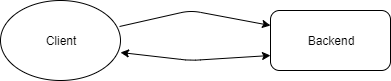
<p><img src="/assets/simple.png" alt="Websocket communication... in theory." /></p>

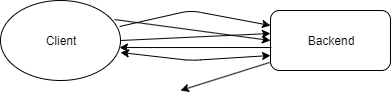
<p>In reality, keeping track of what messages contained what fields,
where they were supposed to go, and who was allowed access got messy pretty
quickly.</p>

<p><img src="/assets/messy.png" alt="Websocket communication in reality" /></p>

<h1 id="the-new-way-a-clearly-defined-interfaces">The new way: A clearly defined interface(s)</h1>

<p>Let’s group our messages in two:</p>

<ul>
  <li>Messages sent from the client</li>
  <li>Messages sent from the server</li>
</ul>

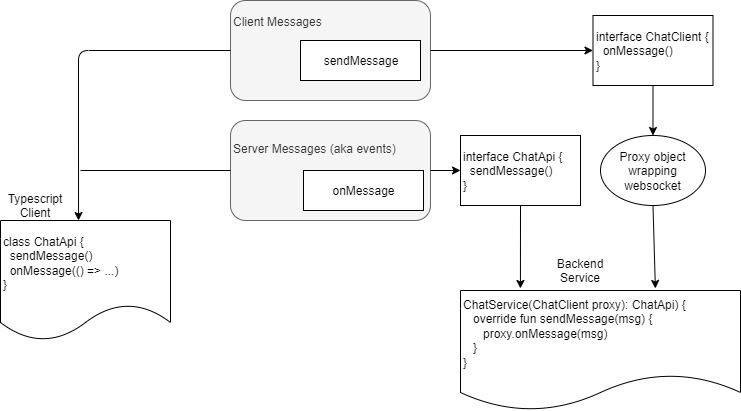
<p><img src="/assets/interface.png" alt="Separating WebSockets into two groups" /></p>

<p>This separation gives us a hint on how we can separate our calls
in code in terms of how we handle it. So we build two interfaces for
our WebSocket service, one for each category:</p>

<ul>
  <li><code class="language-plaintext highlighter-rouge">ChatApi</code>, with methods like <code class="language-plaintext highlighter-rouge">sendMessage()</code> for when a client
initiates an action</li>
  <li><code class="language-plaintext highlighter-rouge">ChatEvents</code>, with methods like <code class="language-plaintext highlighter-rouge">onSendMessage()</code> for when a client
receives an action from the server</li>
</ul>

<p>These two can be combined into a single TypeScript file for clients
to use. The server side is a little more complicated; here’s how I did
it:</p>

<ol>
  <li>Bind all methods from <code class="language-plaintext highlighter-rouge">ChatApi</code> to an implementation, and 
redirect websocket messages to this implementation</li>
  <li>Create a proxy object that implements <code class="language-plaintext highlighter-rouge">ChatEvents</code>, redirecting
any calls to it to a list of WebSocket sessions that have
registered for that event</li>
  <li>Add a special extra “register” method to our WebSocket connection,
that allows clients to add themselves to the list of sessions 
in the client.</li>
</ol>

<p><img src="/assets/websockets.png" alt="The TypeScript and backend integration" /></p>

<p>The result is client code that looks like this:</p>

<div class="language-typescript highlighter-rouge"><div class="highlight"><pre class="highlight"><code><span class="kd">const</span> <span class="nx">api</span> <span class="o">=</span> <span class="k">new</span> <span class="nx">ChatApi</span><span class="p">({</span><span class="na">onOpen</span><span class="p">:</span> <span class="p">()</span> <span class="o">=&gt;</span> <span class="nx">console</span><span class="p">.</span><span class="nx">log</span><span class="p">(</span><span class="dl">"</span><span class="s2">connected</span><span class="dl">"</span><span class="p">)})</span>
<span class="nx">api</span><span class="p">.</span><span class="nx">onMessage</span><span class="p">(</span><span class="nx">msg</span> <span class="o">=&gt;</span> <span class="nx">setMessages</span><span class="p">([...</span><span class="nx">messages</span><span class="p">,</span> <span class="nx">msg</span><span class="p">]))</span>
<span class="c1">//...</span>
<span class="nx">api</span><span class="p">.</span><span class="nx">sendMessage</span><span class="p">(</span><span class="dl">"</span><span class="s2">Wow, that was easy!</span><span class="dl">"</span><span class="p">)</span>
</code></pre></div></div>

<p>With our TypeScript file clearly defining how to interact with
our backend, a little bit of reflective Kotlin code connecting
our WebSocket connection to our backend implementation, and
<a href="https://github.com/vojtechhabarta/typescript-generator">typescript-generator</a>
to share types, we couldn’t have a safer, easier to use API.</p>

<h1 id="who-listens-to-what">Who listens to what?</h1>

<p>Not every message should go to every client. For example, in a chat
app, private messages should only go to their destination. I handled this
with a special annotation on method parameters that allow filtering
of destinations:</p>

<div class="language-kotlin highlighter-rouge"><div class="highlight"><pre class="highlight"><code><span class="kd">interface</span> <span class="nc">ChatEvents</span> <span class="p">{</span>
    <span class="c1">// listening to the "onMessage" event will get all group message events</span>
    <span class="k">fun</span> <span class="nf">onMessage</span><span class="p">(</span><span class="n">message</span><span class="p">:</span> <span class="nc">String</span><span class="p">,</span> <span class="n">from</span><span class="p">:</span> <span class="nc">String</span><span class="p">)</span>
    <span class="c1">// In this case, you'll listen for "onPrivateMessage/&lt;username&gt;" events</span>
    <span class="c1">// to ensure you only receive messages meant for you</span>
    <span class="k">fun</span> <span class="nf">onPrivateMessage</span><span class="p">(</span><span class="nd">@Filter</span> <span class="n">to</span><span class="p">:</span> <span class="nc">String</span><span class="p">,</span> <span class="n">message</span><span class="p">:</span> <span class="nc">String</span><span class="p">,</span> <span class="n">from</span><span class="p">:</span> <span class="nc">String</span><span class="p">)</span>
<span class="p">}</span>
</code></pre></div></div>

<p>By default messages are sent to every listener - but perhaps you might want
to filter messages from being sent back to the caller? I haven’t done so
but depending on your use case this might be worth considering.</p>

<h1 id="show-me-the-code">Show me the code!</h1>

<p>I’ve uploaded
<a href="https://github.com/crummy/kotlin-typescript-websocket-api">a simple demonstration on Github</a>
if you’d like to dig into the details on how it works.</p>]]></content><author><name>Malcolm</name></author><category term="blog" /><summary type="html"><![CDATA[Inspired by recent work on an automatically-generated HTTP API I took a look at our WebSocket API. We had types defined on our backend, and some were shared by our frontend thanks to the typescript-generator plugin, but it was a hodge-podge of hand written TypeScript types and for loops with casts to try to ensure the frontend and backend stayed in sync - in other words, we had a lot of code that described the plumbing rather than doing useful things. Here I’ll demonstrate how we manage to share WebSocket calls, listeners, and types across our frontend and backend, ending up with a single clear and concise interface for us to use.]]></summary></entry><entry><title type="html">Seamless backend/frontend communication with code generation</title><link href="http://malcolmcrum.com/blog/2022/07/30/hand-rolled-api-generator.html" rel="alternate" type="text/html" title="Seamless backend/frontend communication with code generation" /><published>2022-07-30T00:00:00+00:00</published><updated>2022-07-30T00:00:00+00:00</updated><id>http://malcolmcrum.com/blog/2022/07/30/hand-rolled-api-generator</id><content type="html" xml:base="http://malcolmcrum.com/blog/2022/07/30/hand-rolled-api-generator.html"><![CDATA[<p>At work we have a Java backend that exposes HTTP endpoints for our frontend to
call. Some do simple create/read/update/delete, some do specific requests, and
there are a bunch to remember with many different types of objects that are
returned. Because we rely on these API calls so much, we’ve put a lot of effort
into tooling to make the frontend/backend communication as seamless as possible
for our developers. Here is a brief overview before I go into detail:</p>

<ul>
  <li>Java interfaces describe each API and its endpoints</li>
  <li>Each interface is connected to its backend implementation with a special Javalin
handler which exposes each endpoint via HTTP, parses arguments, then calls the
implementation</li>
  <li>Some custom tooling loops through every interface and generates a Typescript
class for each one, with methods to call each endpoint</li>
  <li>The Java library <a href="https://github.com/vojtechhabarta/typescript-generator">typescript-generator</a>
generates Typescript definitions for all the classes used in arguments and return
values of the APIs</li>
</ul>

<p>The end result is that as we add endpoints to our backend, our API client 
automatically generates the methods to call it, making frontend-to-backend calls
almost as easy as native calls. Read on for details on how it works, or view the
<a href="https://github.com/crummy/java-typescript-api-generator">demonstration</a> on Github.</p>

<h1 id="api-definitions">API definitions</h1>

<p>This is the easy part. Our API interfaces look something like this:</p>

<div class="language-java highlighter-rouge"><div class="highlight"><pre class="highlight"><code><span class="kd">interface</span> <span class="nc">UserApi</span> <span class="o">{</span>
    <span class="nc">UserDto</span> <span class="nf">getUser</span><span class="o">(</span><span class="kt">int</span> <span class="n">userId</span><span class="o">);</span>
<span class="o">}</span>
</code></pre></div></div>

<h1 id="backend-implementation-for-our-api">Backend implementation for our API</h1>

<p>Javalin is a great webserver that provides exactly the balance of 
power-to-simplicity that we need. A backend call might look something like this:</p>

<div class="language-plaintext highlighter-rouge"><div class="highlight"><pre class="highlight"><code>POST /api/UsersApi/getUser
{
    'userId': 1001
}
</code></pre></div></div>

<p>So, we create a handler for each of these calls. It involves a bit of reflection
which is a bit hairy but makes things easier for devs:</p>

<div class="language-java highlighter-rouge"><div class="highlight"><pre class="highlight"><code><span class="kd">public</span> <span class="kd">static</span> <span class="kt">void</span> <span class="nf">main</span><span class="o">(){</span>
    <span class="kt">var</span> <span class="n">app</span> <span class="o">=</span> <span class="nc">Javalin</span><span class="o">.</span><span class="na">create</span><span class="o">();</span>
    <span class="c1">// UsersApi is the interface that defines the endpoints.</span>
    <span class="c1">// UsersService is the backend implementation of UsersApi.</span>
    <span class="c1">// We repeat the below for every API we want to expose.</span>
    <span class="n">expose</span><span class="o">(</span><span class="n">app</span><span class="o">,</span><span class="nc">UsersApi</span><span class="o">.</span><span class="na">class</span><span class="o">,</span> <span class="k">new</span> <span class="nc">UsersService</span><span class="o">())</span>
    <span class="n">app</span><span class="o">.</span><span class="na">start</span><span class="o">()</span>
<span class="o">}</span>

<span class="kd">private</span> <span class="o">&lt;</span><span class="no">T</span><span class="o">&gt;</span> <span class="kt">void</span> <span class="nf">expose</span><span class="o">(</span><span class="nc">Javalin</span> <span class="n">app</span><span class="o">,</span> <span class="nc">Class</span><span class="o">&lt;</span><span class="no">T</span><span class="o">&gt;</span> <span class="n">api</span><span class="o">,</span> <span class="no">T</span> <span class="n">implementation</span><span class="o">)</span> <span class="o">{</span>
    <span class="nc">String</span> <span class="n">apiName</span> <span class="o">=</span> <span class="n">api</span><span class="o">.</span><span class="na">getSimpleName</span><span class="o">();</span>
    <span class="k">for</span> <span class="o">(</span><span class="nc">Method</span> <span class="n">method</span> <span class="o">:</span> <span class="n">api</span><span class="o">.</span><span class="na">getMethods</span><span class="o">())</span> <span class="o">{</span>
        <span class="c1">// handle calls to, for example, POST /api/UsersAPI/getUser</span>
        <span class="n">app</span><span class="o">.</span><span class="na">post</span><span class="o">(</span><span class="s">"/api/"</span> <span class="o">+</span> <span class="n">apiName</span> <span class="o">+</span> <span class="s">"/"</span> <span class="o">+</span> <span class="n">method</span><span class="o">.</span><span class="na">getName</span><span class="o">(),</span> <span class="o">(</span><span class="n">ctx</span><span class="o">)</span> <span class="o">-&gt;</span> <span class="o">{</span>
            <span class="nc">Map</span><span class="o">&lt;</span><span class="nc">String</span><span class="o">,</span> <span class="nc">String</span><span class="o">&gt;</span> <span class="n">body</span> <span class="o">=</span> <span class="n">ctx</span><span class="o">.</span><span class="na">bodyAsClass</span><span class="o">(</span><span class="nc">Map</span><span class="o">.</span><span class="na">class</span><span class="o">);</span>
            <span class="nc">List</span><span class="o">&lt;</span><span class="nc">Object</span><span class="o">&gt;</span> <span class="n">args</span> <span class="o">=</span> <span class="k">new</span> <span class="nc">ArrayList</span><span class="o">&lt;&gt;();</span>
            <span class="k">for</span> <span class="o">(</span><span class="nc">Parameter</span> <span class="n">param</span> <span class="o">:</span> <span class="n">method</span><span class="o">.</span><span class="na">getParameters</span><span class="o">())</span> <span class="o">{</span>
                <span class="nc">String</span> <span class="n">json</span> <span class="o">=</span> <span class="n">body</span><span class="o">.</span><span class="na">get</span><span class="o">(</span><span class="n">param</span><span class="o">.</span><span class="na">getName</span><span class="o">());</span>
                <span class="kt">var</span> <span class="n">arg</span> <span class="o">=</span> <span class="no">GSON</span><span class="o">.</span><span class="na">fromJson</span><span class="o">(</span><span class="n">json</span><span class="o">,</span> <span class="n">param</span><span class="o">.</span><span class="na">getParameterizedType</span><span class="o">());</span>
                <span class="n">args</span><span class="o">.</span><span class="na">add</span><span class="o">(</span><span class="n">arg</span><span class="o">);</span>
            <span class="o">}</span>
            <span class="k">try</span> <span class="o">{</span>
                <span class="nc">Object</span> <span class="n">result</span> <span class="o">=</span> <span class="n">method</span><span class="o">.</span><span class="na">invoke</span><span class="o">(</span><span class="n">implementation</span><span class="o">,</span> <span class="n">args</span><span class="o">.</span><span class="na">toArray</span><span class="o">());</span>
                <span class="nc">String</span> <span class="n">json</span> <span class="o">=</span> <span class="n">objectMapper</span><span class="o">.</span><span class="na">writeValueAsBytes</span><span class="o">(</span><span class="n">result</span><span class="o">);</span>
                <span class="n">ctx</span><span class="o">.</span><span class="na">result</span><span class="o">(</span><span class="n">json</span><span class="o">);</span>
            <span class="o">}</span> <span class="k">catch</span> <span class="o">(</span><span class="nc">Exception</span> <span class="n">e</span><span class="o">)</span> <span class="o">{</span>
                <span class="k">throw</span> <span class="k">new</span> <span class="nf">RuntimeException</span><span class="o">(</span><span class="s">"Failed to invoke "</span> <span class="o">+</span> <span class="n">apiName</span> <span class="o">+</span> <span class="s">"/"</span> <span class="o">+</span> <span class="n">method</span><span class="o">,</span> <span class="n">e</span><span class="o">);</span>
            <span class="o">}</span>
        <span class="o">});</span>
    <span class="o">}</span>
<span class="o">}</span>
</code></pre></div></div>

<p>That’s pretty much it. For every API, then every method, expose an endpoint that
deserializes the arguments given, then calls the actual implementation’s method
with those arguments.</p>

<p>The only special thing I’d note here is that the body of our request is not a single
object we can deserialize immediately, but instead is better thought of as a key-value
pair of parameter names to a JSON string. So it’s essentially doubly-serialized JSON.</p>

<p>So! Our backend is ready to receive requests. Next up is the API client.</p>

<h1 id="typescript-client">Typescript client</h1>

<p>The code here works a little like the above again - given an interface like UsersAPI,
iterate over its methods, and iterate over its arguments. However, along the way,
we build a string by appending bits of Typescript to it. The code here is a bit ugly so
I’m going to write some pseudocode to describe it:</p>

<div class="language-plaintext highlighter-rouge"><div class="highlight"><pre class="highlight"><code>String toTypescript(Class... api) {
    for each api:
        typescript += "class ${api.getSimpleName()} {"
        for each method:
            typescript += "${method.getName()}("
            for each parameter:
                typescript += "${parameter.getName()}: ${getType(parameter)}, "
            typescript += "): Promise&lt;${getType(method.returnType)}"&gt;
            var body = Map&lt;String, String&gt;
            typescript += "return fetch('/api/${api}/${method}', {"
            typescript += "   method: 'POST',"
            typescript += "   headers: {'Content-Type': 'application/json', 'Accept': 'application/json'},"
            typescript += "   body: JSON.stringify({"
            for each parameter:
                typescript += "${parameter.getName()}: JSON.stringify(${parameter.getName}), 
            typescript += "   }"
            typescript += "}).then(res =&gt; res.json())
        typescript += "}"
    return typescript
}
</code></pre></div></div>

<p>Hmm… is that more readable? If you’d prefer you can read the
<a href="https://github.com/crummy/java-typescript-api-generator/blob/main/src/main/java/com/malcolmcrum/typescriptapigenerator/typescriptgenerator/TypeScriptApiGenerator.java#L44">actual code</a>
instead. Mine uses raw strings for simplicity, though I suggest using a templating engine instead.
Here’s what you might expect to see in the generated Typescript, as an example:</p>

<div class="language-typescript highlighter-rouge"><div class="highlight"><pre class="highlight"><code><span class="kd">class</span> <span class="nx">UsersAPI</span> <span class="p">{</span>
    <span class="nx">getUser</span><span class="p">(</span><span class="nx">userId</span><span class="p">:</span> <span class="kr">number</span><span class="p">):</span> <span class="nx">UserDto</span> <span class="p">{</span>
        <span class="k">return</span> <span class="nx">fetch</span><span class="p">(</span><span class="dl">'</span><span class="s1">/api/UsersApi/getUser</span><span class="dl">'</span><span class="p">,</span> <span class="p">{</span>
            <span class="na">method</span><span class="p">:</span> <span class="dl">'</span><span class="s1">POST</span><span class="dl">'</span><span class="p">,</span>
            <span class="na">headers</span><span class="p">:</span> <span class="p">{</span><span class="dl">'</span><span class="s1">Content-Type</span><span class="dl">'</span><span class="p">:</span> <span class="dl">'</span><span class="s1">application/json</span><span class="dl">'</span><span class="p">,</span> <span class="dl">'</span><span class="s1">Accept</span><span class="dl">'</span><span class="p">:</span> <span class="dl">'</span><span class="s1">application/json</span><span class="dl">'</span><span class="p">},</span>
            <span class="na">body</span><span class="p">:</span> <span class="nx">JSON</span><span class="p">.</span><span class="nx">stringify</span><span class="p">({</span><span class="na">userId</span><span class="p">:</span> <span class="nx">JSON</span><span class="p">.</span><span class="nx">stringify</span><span class="p">(</span><span class="nx">userId</span><span class="p">)})</span>
        <span class="p">}).</span><span class="nx">then</span><span class="p">(</span><span class="nx">res</span> <span class="o">=&gt;</span> <span class="nx">res</span><span class="p">.</span><span class="nx">json</span><span class="p">())</span>
    <span class="p">}</span>
<span class="p">}</span>
</code></pre></div></div>

<p>We store the above file in <code class="language-plaintext highlighter-rouge">target/ts/api.ts</code>, and generate this file using the
<a href="https://www.mojohaus.org/exec-maven-plugin/">Exec Maven Plugin</a> which lets us run the
client generator when we run <code class="language-plaintext highlighter-rouge">mvn package</code>.</p>

<p>One bit of magic I’m skipping over is the <code class="language-plaintext highlighter-rouge">getType(parameter)</code> call. This converts Java
classes to Typescript equivalents. Here’s basically how the conversions work:</p>

<ul>
  <li><code class="language-plaintext highlighter-rouge">String</code> -&gt; <code class="language-plaintext highlighter-rouge">string</code></li>
  <li><code class="language-plaintext highlighter-rouge">int</code>, <code class="language-plaintext highlighter-rouge">Integer</code>, <code class="language-plaintext highlighter-rouge">float</code>, <code class="language-plaintext highlighter-rouge">Float</code>, <code class="language-plaintext highlighter-rouge">double</code>, <code class="language-plaintext highlighter-rouge">Double</code>, <code class="language-plaintext highlighter-rouge">long</code>, <code class="language-plaintext highlighter-rouge">Long</code> -&gt; <code class="language-plaintext highlighter-rouge">number</code></li>
  <li><code class="language-plaintext highlighter-rouge">Object</code> -&gt; <code class="language-plaintext highlighter-rouge">any</code></li>
  <li><code class="language-plaintext highlighter-rouge">Array&lt;T&gt;</code>, <code class="language-plaintext highlighter-rouge">List&lt;T&gt;</code>, <code class="language-plaintext highlighter-rouge">Set&lt;T&gt;</code>, <code class="language-plaintext highlighter-rouge">Collection&lt;T&gt;</code> -&gt;  <code class="language-plaintext highlighter-rouge">Array&lt;T&gt;</code></li>
  <li><code class="language-plaintext highlighter-rouge">Map&lt;K, V&gt;</code> -&gt; <code class="language-plaintext highlighter-rouge">Record&lt;K, V&gt;</code></li>
  <li>Otherwise, just use the object’s class name (e.g. <code class="language-plaintext highlighter-rouge">UserDto</code>)</li>
</ul>

<p>Now you’re almost ready to call <code class="language-plaintext highlighter-rouge">new UsersApi().getUser(1001)</code> - we’re just missing the
Typescript type for the UserDto returned.</p>

<h1 id="typescript-definitions-for-our-java-types">Typescript definitions for our Java types</h1>

<p>This one’s pretty easy. We have a Java package that contains all the types that we want to use
on the frontend (<code class="language-plaintext highlighter-rouge">com.company.dtos</code>), and we point the Maven plugin
<a href="https://github.com/vojtechhabarta/typescript-generator">typescript-generator</a> to it:</p>

<div class="language-xml highlighter-rouge"><div class="highlight"><pre class="highlight"><code><span class="nt">&lt;plugin&gt;</span>
    <span class="nt">&lt;groupId&gt;</span>cz.habarta.typescript-generator<span class="nt">&lt;/groupId&gt;</span>
    <span class="nt">&lt;artifactId&gt;</span>typescript-generator-maven-plugin<span class="nt">&lt;/artifactId&gt;</span>
    <span class="nt">&lt;version&gt;</span>2.32.889<span class="nt">&lt;/version&gt;</span>
    <span class="nt">&lt;executions&gt;</span>
        <span class="nt">&lt;execution&gt;</span>
            <span class="nt">&lt;id&gt;</span>generate<span class="nt">&lt;/id&gt;</span>
            <span class="nt">&lt;goals&gt;</span>
                <span class="nt">&lt;goal&gt;</span>generate<span class="nt">&lt;/goal&gt;</span>
            <span class="nt">&lt;/goals&gt;</span>
            <span class="nt">&lt;phase&gt;</span>compile<span class="nt">&lt;/phase&gt;</span>
        <span class="nt">&lt;/execution&gt;</span>
    <span class="nt">&lt;/executions&gt;</span>
    <span class="nt">&lt;configuration&gt;</span>
        <span class="nt">&lt;classPatterns&gt;</span>
            <span class="nt">&lt;classPattern&gt;</span>com.company.dto.**<span class="nt">&lt;/classPattern&gt;</span>
        <span class="nt">&lt;/classPatterns&gt;</span>
        <span class="nt">&lt;outputFile&gt;</span>target/ts/types.ts<span class="nt">&lt;/outputFile&gt;</span>
    <span class="nt">&lt;/configuration&gt;</span>
<span class="nt">&lt;/plugin&gt;</span>
</code></pre></div></div>

<p>Assuming we have a UserDto class like this:</p>

<div class="language-java highlighter-rouge"><div class="highlight"><pre class="highlight"><code><span class="kd">public</span> <span class="n">record</span> <span class="nf">UserDto</span><span class="o">(</span><span class="kt">int</span> <span class="n">userId</span><span class="o">,</span> <span class="nc">String</span> <span class="n">username</span><span class="o">)</span> <span class="o">{}</span>
</code></pre></div></div>

<p>We’ll end up with a <code class="language-plaintext highlighter-rouge">types.ts</code> file like this:</p>

<div class="language-typescript highlighter-rouge"><div class="highlight"><pre class="highlight"><code><span class="kr">interface</span> <span class="nx">UserDto</span> <span class="p">{</span>
    <span class="nl">userId</span><span class="p">:</span> <span class="kr">number</span><span class="p">,</span>
    <span class="nx">username</span><span class="p">:</span> <span class="kr">string</span>
<span class="p">}</span>
</code></pre></div></div>

<h1 id="putting-it-all-together">Putting it all together</h1>

<p>So, now we have:</p>

<ul>
  <li>A Javalin server with endpoints ready to deserialize parameters for each of our backend methods</li>
  <li>An <code class="language-plaintext highlighter-rouge">api.ts</code> file with classes ready to query each of those endpoints</li>
  <li>A <code class="language-plaintext highlighter-rouge">types.ts</code> file that describes the types for both the parameters and returns of those endpoints</li>
</ul>

<p>The end result is that adding a new endpoint looks like this:</p>

<ol>
  <li>Add <code class="language-plaintext highlighter-rouge">void changeUsername(int userId, String newUsername)</code> call to interface, and implement it
on the backend</li>
  <li>Run <code class="language-plaintext highlighter-rouge">mvn package</code> to update our Typescript files</li>
  <li>In the frontend, write <code class="language-plaintext highlighter-rouge">new UsersService().changeUsername(1001, "foo")</code> - that’s it!</li>
</ol>

<h1 id="caveats">Caveats</h1>

<p>There are a few lessons we’ve learned along the way that are worth noting, including:</p>

<ul>
  <li>Java’s <code class="language-plaintext highlighter-rouge">Map</code> is a lot more flexible than Javascript objects. Particularly
in Javascript objects can only have strings as keys, so don’t return a
<code class="language-plaintext highlighter-rouge">Map&lt;MyRecord, String&gt;</code></li>
  <li>Javascript has no method overloading so if you declare a <code class="language-plaintext highlighter-rouge">getUser()</code>
and <code class="language-plaintext highlighter-rouge">getUser(int userId)</code> you’ll run into issues.</li>
</ul>

<h1 id="conclusions">Conclusions</h1>

<p>I’m a big fan of typed languages (hence Java backend and Typescript frontend) but traditionally
there is a disconnect between types on the two domains. This tooling allows us to modify a method
or class in one place and immediately be comfortable using it everywhere else, or see errors
during compile time when we’re misusing it. This tooling catches so many bugs and allows development
to be so much faster that I can’t imagine working without it now. I know there are some
similar tools out there but they either add a significant amount of complexity (OpenAPI) or are
locked into a certain stack (Remix). Building our own offers significant control at a relatively
minor cost (i.e. it’s just not that complicated).</p>

<p>As an example: we pass dates around to the frontend with epoch millis. But sometimes when you’re
staring at a <code class="language-plaintext highlighter-rouge">long</code> you might think it stores epoch <em>seconds</em>. Java has a better class for this:
<code class="language-plaintext highlighter-rouge">Instant</code>, which you can retrieve either from. I wanted our devs to use <code class="language-plaintext highlighter-rouge">Instant</code>s instead of
<code class="language-plaintext highlighter-rouge">long</code>s in our DTOs, so:</p>

<ol>
  <li>I added a <code class="language-plaintext highlighter-rouge">long</code> to <code class="language-plaintext highlighter-rouge">Instant</code> deserializer and <code class="language-plaintext highlighter-rouge">Instant</code> to <code class="language-plaintext highlighter-rouge">long</code> serializer to our JSON serializer</li>
  <li>I told <code class="language-plaintext highlighter-rouge">typescript-generator</code> to convert <code class="language-plaintext highlighter-rouge">Instant</code>s to <code class="language-plaintext highlighter-rouge">number</code>s with a <code class="language-plaintext highlighter-rouge">&lt;customTypeMapping&gt;</code>
in <code class="language-plaintext highlighter-rouge">types.d.ts</code></li>
  <li>I adjusted my <code class="language-plaintext highlighter-rouge">getType(parameter)</code> class to convert <code class="language-plaintext highlighter-rouge">Instant</code>s to <code class="language-plaintext highlighter-rouge">number</code>s instead in <code class="language-plaintext highlighter-rouge">api.ts</code></li>
</ol>

<p>That was it! Having written our own tooling this was an easy task and allowed us to further
strengthen our use of types to reduce another source of bugs.</p>

<h1 id="complete-demo">Complete demo</h1>

<p>You can find a full demo on Github here:
<a href="https://github.com/crummy/java-typescript-api-generator">crummy/java-typescript-api-generator</a></p>]]></content><author><name>Malcolm</name></author><category term="blog" /><summary type="html"><![CDATA[At work we have a Java backend that exposes HTTP endpoints for our frontend to call. Some do simple create/read/update/delete, some do specific requests, and there are a bunch to remember with many different types of objects that are returned. Because we rely on these API calls so much, we’ve put a lot of effort into tooling to make the frontend/backend communication as seamless as possible for our developers. Here is a brief overview before I go into detail:]]></summary></entry><entry><title type="html">Seamless Deployments with Nginx + Docker Compose + Websockets</title><link href="http://malcolmcrum.com/blog/2022/07/03/seamless-deployments-with-nginx-docker-compose.html" rel="alternate" type="text/html" title="Seamless Deployments with Nginx + Docker Compose + Websockets" /><published>2022-07-03T00:00:00+00:00</published><updated>2022-07-03T00:00:00+00:00</updated><id>http://malcolmcrum.com/blog/2022/07/03/seamless-deployments-with-nginx-docker-compose</id><content type="html" xml:base="http://malcolmcrum.com/blog/2022/07/03/seamless-deployments-with-nginx-docker-compose.html"><![CDATA[<p>Docker is becoming the de facto standard for packaging web applications, and Docker Compose
is a pretty simple way to deploy it. One downside is that during a deployment, the old version
is taken down before the new version is deployed, causing a brief service outage for clients:</p>

<ol>
  <li>Docker Compose runs</li>
  <li>The old web app is taken down</li>
  <li>The new web app is started</li>
</ol>

<p>Between steps 2 and 3, users will see error messages on our website (for a few seconds). Not
long but long enough that we’d avoid deploys during busy times, and I wanted our developers
to be able to deploy as often and as easily as possible.</p>

<h1 id="seamlessly-deploying-the-app">Seamlessly deploying the app</h1>

<p>The engineering team at Tines
<a href="https://engineering.tines.com/blog/simple-zero-downtime-deploys">came up with a solution</a>
which I have adopted. The process involves, with a simple bash script:</p>

<ol>
  <li>Spin up a new instance of the web app using Docker Compose</li>
  <li>Wait until it has booted</li>
  <li>Reload Nginx</li>
  <li>Stop the old instance of the web app</li>
  <li>Reload Nginx</li>
</ol>

<p>This is what more complex systems do during deployments but the simplicity of a bash script
and Compose is pretty nice.</p>

<h1 id="seamlessly-handling-websocket-clients">Seamlessly handling WebSocket clients</h1>

<p>Even if the above ensures no HTTP requests are dropped, any live websocket connections
will be interrupted. There’s a 
<a href="https://nimblea.pe/monkey-business/2015/05/19/achieving-zero-downtime-deployments-with-nodejs-and-websockets/">simple solution for that:</a></p>

<ol>
  <li>Register a shutdown hook in the web app: on disconnect, send a special “RECONNECT” message
to all WebSocket clients</li>
  <li>Clients, upon receipt of the message, disconnect their WebSocket connections, pause a moment,
then try to reconnect</li>
  <li>Their new connection is handled by the new web app instance</li>
</ol>

<h1 id="reducing-complexity-with-caddy">Reducing complexity with Caddy</h1>

<p>I was proud of the above work, but it did bug me a bit. We had made our deployments seamless
enough that we could deploy without anyone noticing, but our simple “docker-compose up -d”
script had been replaced with something fairly esoteric, even if it was plain Bash.</p>

<p>An unrelated problem had lead me towards thinking of replacing Nginx with Caddy, a new-on-the-block
webserver that is a lot simpler to operate. I wasn’t sure how it would work with the seamless
deployment script we’d created, so I dug in to see how hard it would be to replicate and discovered
a simple difference between Caddy and Nginx:</p>

<ul>
  <li>With Nginx, if a request comes in and a backend is not available to handle it, an error
is returned to the client immediately</li>
  <li>With Caddy, if a request comes in and a backend is not available to handle it, Caddy
waits for a while for the backend, giving up only after a timeout is reached.</li>
</ul>

<p>This change in behaviour means that we are able to achieve near-seamless deployments - 
if you happen to visit our website at the wrong time, you might experience a brief delay
(probably not noticeable due to caching) but you won’t see any ugly error messages.</p>

<h1 id="simplicity-wins">Simplicity wins</h1>

<p>So, with Caddy instead of Nginx, we can throw away the ugly bash script and go back to plain
Docker Compose deploys. As long as our web app boots up quickly, it’s difficult to notice
a deploy happening even if you’re watching closely.</p>

<p>Sacrificing a small amount of functionality for a big decrease in systemic complexity is
a definite win in my opinion.</p>

<p>You can find a full working demonstration of the Nginx solution on
<a href="https://github.com/crummy/zero-downtime-websockets">Github</a>.</p>]]></content><author><name>Malcolm</name></author><category term="blog" /><summary type="html"><![CDATA[Docker is becoming the de facto standard for packaging web applications, and Docker Compose is a pretty simple way to deploy it. One downside is that during a deployment, the old version is taken down before the new version is deployed, causing a brief service outage for clients:]]></summary></entry><entry><title type="html">JetBrains Projector in WSL2</title><link href="http://malcolmcrum.com/blog/2021/03/08/jetbrains-projector-in-wsl2.html" rel="alternate" type="text/html" title="JetBrains Projector in WSL2" /><published>2021-03-08T00:00:00+00:00</published><updated>2021-03-08T00:00:00+00:00</updated><id>http://malcolmcrum.com/blog/2021/03/08/jetbrains-projector-in-wsl2</id><content type="html" xml:base="http://malcolmcrum.com/blog/2021/03/08/jetbrains-projector-in-wsl2.html"><![CDATA[<p>So: You’ve got a nice fast Windows desktop, and a nice portable laptop, and you want to edit code in IntelliJ on
the laptop and run it on the desktop. Seems easy enough, right? VS Code does this pretty much out-of-the-box with
its Remote Development feature. But for (apparently complex architectural) reasons this is not so easily done on
JetBrains IDEs, so instead they’ve released software called Projector that allows them to run the IDE on the
server, but rendering the GUI over HTTP to your web browser. Sounds a little crazy but it works quite well!</p>

<h1 id="maybe-avoid-docker">Maybe avoid Docker</h1>

<p>You can try Jetbrains Projector out right now with their Docker setup: https://github.com/JetBrains/projector-docker</p>

<p>However, beyond clicking around and marvelling at how much like local IntelliJ it is, you’ll quickly run into some
limitations: you’ve got to mount your user folder for persistence (easy enough), the Docker container is missing
permissions and tools you’ll soon want to install (possible to fix) and once you want to run a service and expose
a port… it all gets a bit hairy.</p>

<p>Don’t get me wrong: I love Docker. But if you want to use Projector heavily I suggest skipping it here.</p>

<h1 id="step-one-install-jetbrains-projector">Step one: Install Jetbrains Projector</h1>

<p>I’ll assume you have WSL2 installed. To install, pull the Projector repo and follow their install steps. I’m
on Ubuntu, so I ran:</p>

<div class="language-plaintext highlighter-rouge"><div class="highlight"><pre class="highlight"><code>git pull https://github.com/JetBrains/projector-installer
sudo apt install python3 python3-pip 
pip3 install projector-installer --user 
</code></pre></div></div>
<p>You might need to restart your session if you have a fresh WSL2 install - the installer would have created a
<code class="language-plaintext highlighter-rouge">~/local/bin</code> folder and your <code class="language-plaintext highlighter-rouge">PATH</code> won’t have noticed it.</p>

<p><code class="language-plaintext highlighter-rouge">projector run</code> will let you confirm it’s working, though you’ll only be able to access this from your
Windows machine.</p>

<h1 id="step-two-expose-wsl2-ports-to-the-local-network">Step two: Expose WSL2 ports to the local network</h1>

<p>There are a variety of ways of doing this, but as far as I can tell, this is the easiest and most reliable.</p>

<p>WSL2 does automatically expose ports from the Linux environment to your local machine so you can access them
in Windows - but only your local machine, so you can’t access them from your laptop on the same network. There’s
a tool that modifies this behaviour so the ports are exposed to all listeners, called WSLHostPatcher:</p>

<ol>
  <li>Download the latest release from https://github.com/CzBiX/WSLHostPatcher/releases (I tested v0.1.0)</li>
  <li>Unzip the file</li>
  <li>Run the WSLHostPatcher.exe</li>
</ol>

<p>Now you can run <code class="language-plaintext highlighter-rouge">projector run</code> in WSL2 and access <code class="language-plaintext highlighter-rouge">http://windows-computer-name:9999</code> from any machine on your
network.</p>

<h1 id="step-three-optional-set-up-ssl">Step three (optional): Set up SSL</h1>

<p>Browsers lock some functionality behind SSL connections only - for example, if you don’t have HTTPS, then copy
and paste might not work super reliable. The easiest way to fix this is with Caddy.</p>

<p>First, install Caddy on your WSL2 instance: https://caddyserver.com/docs/install#debian-ubuntu-raspbian . Then,
create a Caddyfile like so:</p>
<div class="language-plaintext highlighter-rouge"><div class="highlight"><pre class="highlight"><code>localhost {
        reverse_proxy localhost:9999
}
&lt;windows-computer-name&gt; {
        tls internal
        reverse_proxy localhost:9999
}
</code></pre></div></div>
<p>Now you can <code class="language-plaintext highlighter-rouge">curl https://localhost</code> from within WSL2 - but notice if you access <code class="language-plaintext highlighter-rouge">https://localhost</code> you get SSL
errors. That’s because Caddy generates its own SSL root certificate, and though it automatically trusts them
on the machine you have Caddy on (WSL2), we have to manually trust them elsewhere.</p>

<p>Find the root certificate in <a href="https://caddyserver.com/docs/conventions#data-directory">Caddy’s data directory</a>,
and copy it to your laptop (either via SCP, or copy+paste). Then add it to your local keystore (on a Mac, by
double clicking it, then opening Keychain Access, searching for Caddy, then marking it as Trusted.)</p>

<p>Now you can visit <code class="language-plaintext highlighter-rouge">https://windows-computer-name</code> from your laptop while IntelliJ runs on your desktop. Enjoy!</p>]]></content><author><name>Malcolm</name></author><category term="blog" /><summary type="html"><![CDATA[So: You’ve got a nice fast Windows desktop, and a nice portable laptop, and you want to edit code in IntelliJ on the laptop and run it on the desktop. Seems easy enough, right? VS Code does this pretty much out-of-the-box with its Remote Development feature. But for (apparently complex architectural) reasons this is not so easily done on JetBrains IDEs, so instead they’ve released software called Projector that allows them to run the IDE on the server, but rendering the GUI over HTTP to your web browser. Sounds a little crazy but it works quite well!]]></summary></entry><entry><title type="html">Storefront.nz: a minimal online shop</title><link href="http://malcolmcrum.com/blog/2020/04/21/storefront.html" rel="alternate" type="text/html" title="Storefront.nz: a minimal online shop" /><published>2020-04-21T00:00:00+00:00</published><updated>2020-04-21T00:00:00+00:00</updated><id>http://malcolmcrum.com/blog/2020/04/21/storefront</id><content type="html" xml:base="http://malcolmcrum.com/blog/2020/04/21/storefront.html"><![CDATA[<p>For the last few weeks I’ve been in COVID-19 self isolation, and on unpaid
leave, so things have been pretty quiet. My parents, on the other hand, own
a small orchard and are classed as essential personnel, so they’ve been hard
at work picking plums, grading them, packing, and (as the market is closed)
hand delivering fruit around the region, and sometimes shipping boxes further
afield. A lot of the manual labour is unavoidable but the sales and payments
seemed like a lot of wasted work, so I thought I’d try to help with a simple
website where customers could order fruit.</p>

<p>My goals were:</p>

<ul>
  <li>As cheap as possible to run - margins are pretty thin on the orchard and
you can only sell during the season so we don’t want regular monthly fees.
Plus any small cost and you start running into Squarespace territory.</li>
  <li>As simple as possible to use - for customers, this is a page where they can
choose what they want and buy it, no fancy marketing or gloss.</li>
  <li>Flexible enough for other stores - there’s a local grocery store that’s
doing delivery during COVID-19 and ordering is a painful process with a PDF
to print. It made me think there must be other small shops out there with a
need for this.</li>
</ul>

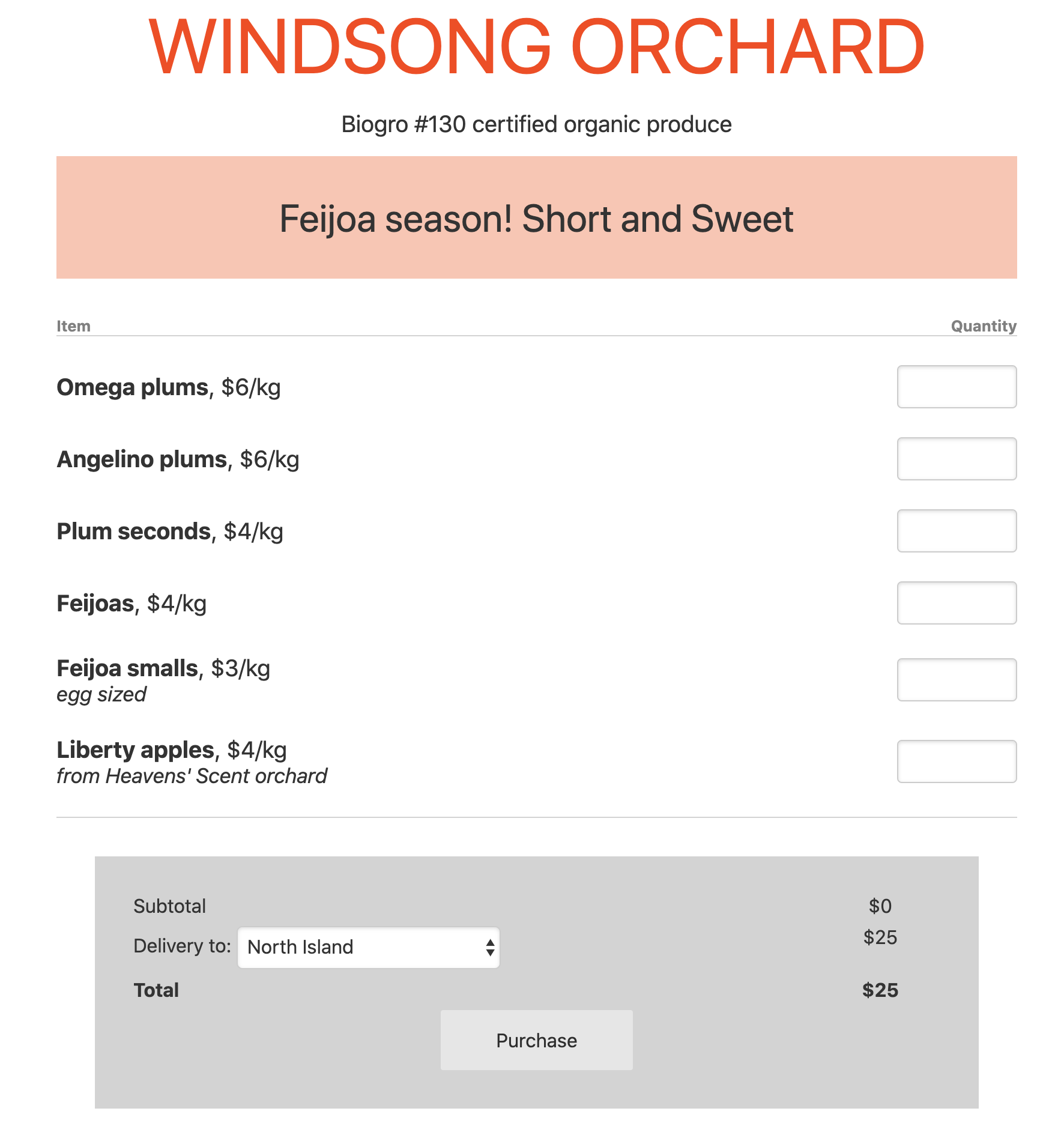
<p><a href="https://www.storefront.nz/windsong">Here’s what I built</a>, and how:</p>

<p><img src="/assets/storefront_windsong.png" alt="Windsong Orchard page on Storefront.nz" /></p>

<h1 id="aws">AWS</h1>

<p>Amazon has a bunch of tech to host a website, and to hook you they have a free
tier on a bunch of their services. I used AWS Lambda for my backend, S3 and
CloudFront to host the frontend, and DynamoDB to store shop configuration and
order data - all of which should be free, unless I get some extremely unusual
load. The only AWS service that’s not totally free is SES to send notification
emails to the store owner when a purchase has been made - and that’s 14c/GB,
which is a looot of emails.</p>

<p>I used Serverless Framework to deploy most of this stuff, though the static
website is deployed separately, set up with CloudFormation. Initially I felt
a little iffy about adding a layer of abstraction but Serverless has a lot
of useful plugins and frankly writing CloudFormation is a real pain.</p>

<h1 id="stripe">Stripe</h1>

<p>Stripe will let you integrate as much as you want with them - hooking deeply
into their APIs to handle payments and handling everything else on your end.
But they also have something called Stripe Checkout which lets you push as
much onto them as possible. My backend gives Stripe a list of items and a
price, then I redirect the customer to Stripe which collects shipping address,
email, and payment. When the charge has been successfull, Stripe notifies
the backend (with the payment and address details) and the customer is
redirected back to an order completion page I made. Super easy.</p>

<p>They also have a really nice test data toggle with separate API keys. Testing
third party integrations is often a painful experience and this really
made it easy.</p>

<h1 id="google-sheets">Google Sheets</h1>

<p>Almost the highlight of this project is the use of a single Google Sheet as
a CMS.</p>

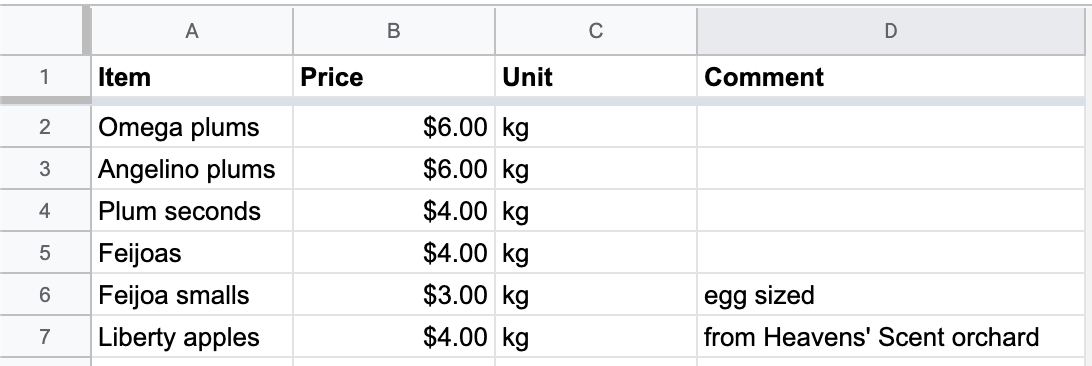
<p><img src="/assets/storefront_sheet.png" alt="Google Sheet backing the Windsong Orchard page" /></p>

<p>Crucially, this allows clients to easily manage inventory in an interface
they’re already familiar with, and saves me not only from building a UI and
backend to manage all this but more importantly removes the need for an admin
login which saves us from a whole set of problems. Much easier to use the Google
Sheet’s permission system to manage things.</p>

<p>The API is a liiittle slow to respond but it’s a small issue and it would be easy
to cache the spreadsheet in DynamoDB if needed. (Actually, if I really wanted
to do this right, when the spreadsheet updated I’d trigger a Lambda to generate
a static page generated from the spreadsheet…)</p>

<h1 id="what-went-wrong">What went wrong</h1>

<p>The backend is built in NodeJS, but it didn’t actually start that way. I built
the entire thing in Kotlin using the Ktor web framework, planning to run it in
Fargate, an AWS service that hosts Docker containers - but it turns out Fargate
doesn’t have a free plan. AWS Lambda looked nice but as much as I love Kotlin,
it runs on the JVM which runs very fast but takes an unusually long time to 
boot up.</p>

<p>How Lambda works is when an HTTP request comes in from a user, it boots up the
service to respond to it, handles the request, and then shuts down the service
later - everything is done on the fly. This comes with a lot of advantages but
it does mean that if your service takes a while to boot, users will suffer
slow response times.</p>

<p>So, I threw out all my Kotlin code and rewrote it in NodeJS, known for fast
boot times. I went with Typescript which was a pleasant experience, particularly
when querying the Google Sheets API.</p>

<h1 id="conclusions">Conclusions</h1>

<ul>
  <li>For someone who isn’t a frontend developer, Svelte was a pleasure to work with.
I understand its advantages are being responsive and small but I appreciated
being able to write actual HTML+CSS+JS and it all working like I expected.</li>
  <li>Google Sheets as a CMS is a highly underrated option! Reading and writing
to it is easy and it’s so good not to have to deal with security on your own app.
Obviously you wouldn’t want to use it for something huge but there are lots of
small sites out there.</li>
  <li>Writing CloudFormation reminds me of the worst parts of programming: googling
for a solution, copy pasting code, hoping it works. I can’t imagine ever writing
it from scratch and I can see why abstractions like Serverless Framework are
popular.</li>
</ul>]]></content><author><name>Malcolm</name></author><category term="blog" /><category term="project" /><summary type="html"><![CDATA[For the last few weeks I’ve been in COVID-19 self isolation, and on unpaid leave, so things have been pretty quiet. My parents, on the other hand, own a small orchard and are classed as essential personnel, so they’ve been hard at work picking plums, grading them, packing, and (as the market is closed) hand delivering fruit around the region, and sometimes shipping boxes further afield. A lot of the manual labour is unavoidable but the sales and payments seemed like a lot of wasted work, so I thought I’d try to help with a simple website where customers could order fruit.]]></summary></entry><entry><title type="html">Weaknotes 5</title><link href="http://malcolmcrum.com/blog/2019/02/18/weaknotes-5.html" rel="alternate" type="text/html" title="Weaknotes 5" /><published>2019-02-18T00:00:00+00:00</published><updated>2019-02-18T00:00:00+00:00</updated><id>http://malcolmcrum.com/blog/2019/02/18/weaknotes-5</id><content type="html" xml:base="http://malcolmcrum.com/blog/2019/02/18/weaknotes-5.html"><![CDATA[<p>Two successful kiteboarding sessions over the weekend! Had a fair bit of stopping and
starting but eventually found the groove and wow, the feeling of being pulled over
the water at high speed by the wind is like flying.</p>

<p>Starting is tricky - I lie on my back with my board downwind and the kite directly
above me, then swoop it downwind to provide enough power to pull me up on top of the
board. This is the easy part though. Now the kite needs to be put in the right
position to pull me along at the right speed, the board needs to be in the right
place to go where I’m headed, and I need to lean back the right amount to counter-
balance the whole thing. I can’t figure out what the combination of all three things
are, but sometimes I hit upon it by accident and then I’m off.</p>

<p>It is very wind-sensitive however (obviously I suppose). 15-20 knots is the sweet 
spot (for me at least) and I’ve become very sensitive to the inaccuracies of the
weather report.</p>

<ul>
  <li>I said it last week but Apex Legends is still very good. I have a few more wins
under my belt now but losing doesn’t make me feel that discouraged. I think there is
a balance to be struck between making player deaths important and not causing
frustration.</li>
  <li>I was reminded of the one-hand-one-bounce rule in kids cricket (usually a rule
adopted in casual games where a tennis ball is used - the usual rule is that catching
someone without a bounce gets them out, but this rule allows a single bounce if you
catch it with a single hand). I think this was the first time I thought about game
mechanics and balancing, and it’s still a great example of it.</li>
  <li>We bought a car. Figured we would need one eventually so may as well get it now
than keep spending the odd money on taxis or rentals.</li>
</ul>]]></content><author><name>Malcolm</name></author><category term="blog" /><category term="weaknotes" /><summary type="html"><![CDATA[Two successful kiteboarding sessions over the weekend! Had a fair bit of stopping and starting but eventually found the groove and wow, the feeling of being pulled over the water at high speed by the wind is like flying.]]></summary></entry><entry><title type="html">Apex Legends - Polished to a shine</title><link href="http://malcolmcrum.com/blog/2019/02/11/apex-legends.html" rel="alternate" type="text/html" title="Apex Legends - Polished to a shine" /><published>2019-02-11T00:00:00+00:00</published><updated>2019-02-11T00:00:00+00:00</updated><id>http://malcolmcrum.com/blog/2019/02/11/apex-legends</id><content type="html" xml:base="http://malcolmcrum.com/blog/2019/02/11/apex-legends.html"><![CDATA[<p>Apex Legends is the latest in a genre nearing saturation, amongst “battle royale” shooters
like Fortnite and PUBG. I was struck at just how “good” it felt immediately upon playing it,
and after reading <a href="https://twitter.com/mossmouth/status/1094742994236801025">Derek Yu’s twitter thread on “jank”</a>
I started thinking about viewing games through the lens of what they do new and what they
do well.</p>

<p>Though Apex Legends does introduce some genuinely new concepts, they’re mostly small
improvements to the core gameplay loop, or the streamlining of existing systems. A few 
things to call out:</p>

<ul>
  <li>Even after being killed, your teammates can rescue your “banner” and take it to special
respawn points that bring you back - without any gear, however. This avoids unlucky players
having to spectate the rest of the match, but doesn’t unbalance things too much as the time
and equipment loss your team suffers can be a significant setback.</li>
  <li>The map plays a lot more vertically than other battle royale titles. Part of this is just
level design, but the lack of fall damage and ziplines that take you way up and let you
semi-respawn again help too.</li>
  <li>The loot UX is just plain easier - picking up weapon attachments and they automatically
equip, you can’t easily pick up an item you don’t need or an item that is a strict 
downgrade, and overall less time is wasted fiddling with inventory.</li>
  <li>Communication is easy and automatic thanks to a smart spotting system that lets you easily
point out helpful information or warnings to your teammates plus your characters chatting
useful information out loud at times.</li>
  <li>The game just “feels” good. This partially comes down to low input lag and consistent 
frame rates but I think you really can see the studio’s FPS experience coming through strong
here.</li>
</ul>

<p>I think I conceptually appreciate games that push boundaries a bit more, but while the
back-of-the-box description of Apex Legends sounds boring, actually playing it feels 
instantly satisfying on a gut level. Respawn Entertainment gets first person shooters.</p>]]></content><author><name>Malcolm</name></author><category term="blog" /><category term="video game" /><category term="review" /><summary type="html"><![CDATA[Apex Legends is the latest in a genre nearing saturation, amongst “battle royale” shooters like Fortnite and PUBG. I was struck at just how “good” it felt immediately upon playing it, and after reading Derek Yu’s twitter thread on “jank” I started thinking about viewing games through the lens of what they do new and what they do well.]]></summary></entry><entry><title type="html">Weaknotes 4</title><link href="http://malcolmcrum.com/blog/2019/01/28/weaknotes-4.html" rel="alternate" type="text/html" title="Weaknotes 4" /><published>2019-01-28T00:00:00+00:00</published><updated>2019-01-28T00:00:00+00:00</updated><id>http://malcolmcrum.com/blog/2019/01/28/weaknotes-4</id><content type="html" xml:base="http://malcolmcrum.com/blog/2019/01/28/weaknotes-4.html"><![CDATA[<p>A week with a client looking into some of their software has had me thinking about complexity.
Some older code uses Spring Boot, which was a simplified approach to the complexity of 
Spring Framework, which itself was a response to the complexity of J2EE. And yet it’s still
a giant hulking piece of software to use, and while there may be 100 great features it provides,
if we only need 2 of those I think it’s worth remembering that they don’t come free.</p>

<p>Someone once told me that all code is baggage and I wish we remembered this more often. Spring
Boot lets you do tasks that may have been complicated otherwise very easily, but it comes with
a lot of code AKA baggage, and it will weigh you down. One obvious but painful side effect of
using a complex framework is large and inscrutable stacktraces. Developers spend a lot of time
looking at stacktraces, and making this task harder is not to be taken lightly!</p>

<p>In a more abstract sense I think as developers we should at all times try to limit complexity.
But not just complexity of the code we write - libraries, frameworks, etc all increase 
complexity of the application as a whole. Writing a hundred more lines (or even a thousand)
could easily be worth it if you can avoid tying your application to some larger monster
framework.</p>

<ul>
  <li>In my case I’ve been working on an application that uses Spring Integration, which 
seems to be a message bus on top of Spring. Methods have inbound and outbound channels,
and this dictates the program flow instead of methods just calling other methods. I’m trying
to guess at why it was used and my only guess is: it seems cool. But it adds nothing else
but complexity!</li>
  <li>Third lesson of kitesurfing and it’s hard to stay patient. I just want to fly the kite
around in a good wind, to feel the power of it! Next one will be a private lesson so at least
I don’t have to trade off so much.</li>
  <li>I enjoyed <a href="this
video about ideas spreading like germs">https://www.youtube.com/watch?v=rE3j_RHkqJc&amp;fbclid=IwAR3vMzXWVVNQJRYW4YejiSw3OQJYEPDYymiTWxa0tyZCPLUezqkDeaki6W8</a>. Reminds me of Snow Crash. One of the ideas I’ve been
coming to terms with over the last year is that allowing people to communicate faster and
easier than before can not only have negative effects but is perhaps a net negative overall?
I hope Mark Zuckerberg stays up at night thinking about this.</li>
</ul>]]></content><author><name>Malcolm</name></author><category term="blog" /><category term="weaknotes" /><summary type="html"><![CDATA[A week with a client looking into some of their software has had me thinking about complexity. Some older code uses Spring Boot, which was a simplified approach to the complexity of Spring Framework, which itself was a response to the complexity of J2EE. And yet it’s still a giant hulking piece of software to use, and while there may be 100 great features it provides, if we only need 2 of those I think it’s worth remembering that they don’t come free.]]></summary></entry><entry><title type="html">Weaknotes 3</title><link href="http://malcolmcrum.com/blog/2019/01/20/weaknotes-3.html" rel="alternate" type="text/html" title="Weaknotes 3" /><published>2019-01-20T00:00:00+00:00</published><updated>2019-01-20T00:00:00+00:00</updated><id>http://malcolmcrum.com/blog/2019/01/20/weaknotes-3</id><content type="html" xml:base="http://malcolmcrum.com/blog/2019/01/20/weaknotes-3.html"><![CDATA[<p>First week at the new job is done. Three days of intros and meetings and trying to remember names, then two days
on-site with a client. I always enjoy getting a new laptop and setting it up just right, but Friday discovered
we’d have to work inside Windows VMs to be able to access this customer’s intranet. Oh well.</p>

<ul>
  <li>Watched <em>The Breaker-Upperers</em>, which was very funny though the drama seemed a little forced.</li>
  <li>Trying to get our finances in order, I set up <a href="https://firefly-iii.org/">Firefly III</a>, a self-hosted finance
manager. Seems to work pretty well so far, there’s a way to access most banks via a shared API called Spectre.
The whole point is to be able to answer questions about our money (e.g. how much do we spend on X) but coming up
with a categorization/tagging system is difficult when you don’t really know what questions you’ll want to ask
in the future. There are similar problems in software architecture.</li>
  <li>Don’t know what my superpower is but my inability to remember names is definitely my superweakness.</li>
</ul>]]></content><author><name>Malcolm</name></author><category term="blog" /><category term="weaknotes" /><summary type="html"><![CDATA[First week at the new job is done. Three days of intros and meetings and trying to remember names, then two days on-site with a client. I always enjoy getting a new laptop and setting it up just right, but Friday discovered we’d have to work inside Windows VMs to be able to access this customer’s intranet. Oh well.]]></summary></entry></feed>